Kalkan logoKalkan
Antidetect browser for Windows

Next Generation
Local Anti-Detect Browser
RPA · Cookie Bot · Unlimited Profiles

Kalkan has four engines: Kalkan Native (recommended), our own Chromium build that produces the fingerprint inside the browser's C++ code; Kalkan (Chrome patch), which drives the real Google Chrome on your computer with a patched driver; Kalkan Edge, the same layer on your installed Microsoft Edge; and Firefox. Build flows without code and run them across hundreds of profiles at once; your profiles, cookies and sessions stay on your own computer.

No card needed · Pay with crypto · Profiles stay on your computer

Three things that set Kalkan apart

Identity consistent page · iframe · worker
Proxy · DE Berlin kill-switch on
Europe/Berlin · de-DE matched to the IP
Kalkan
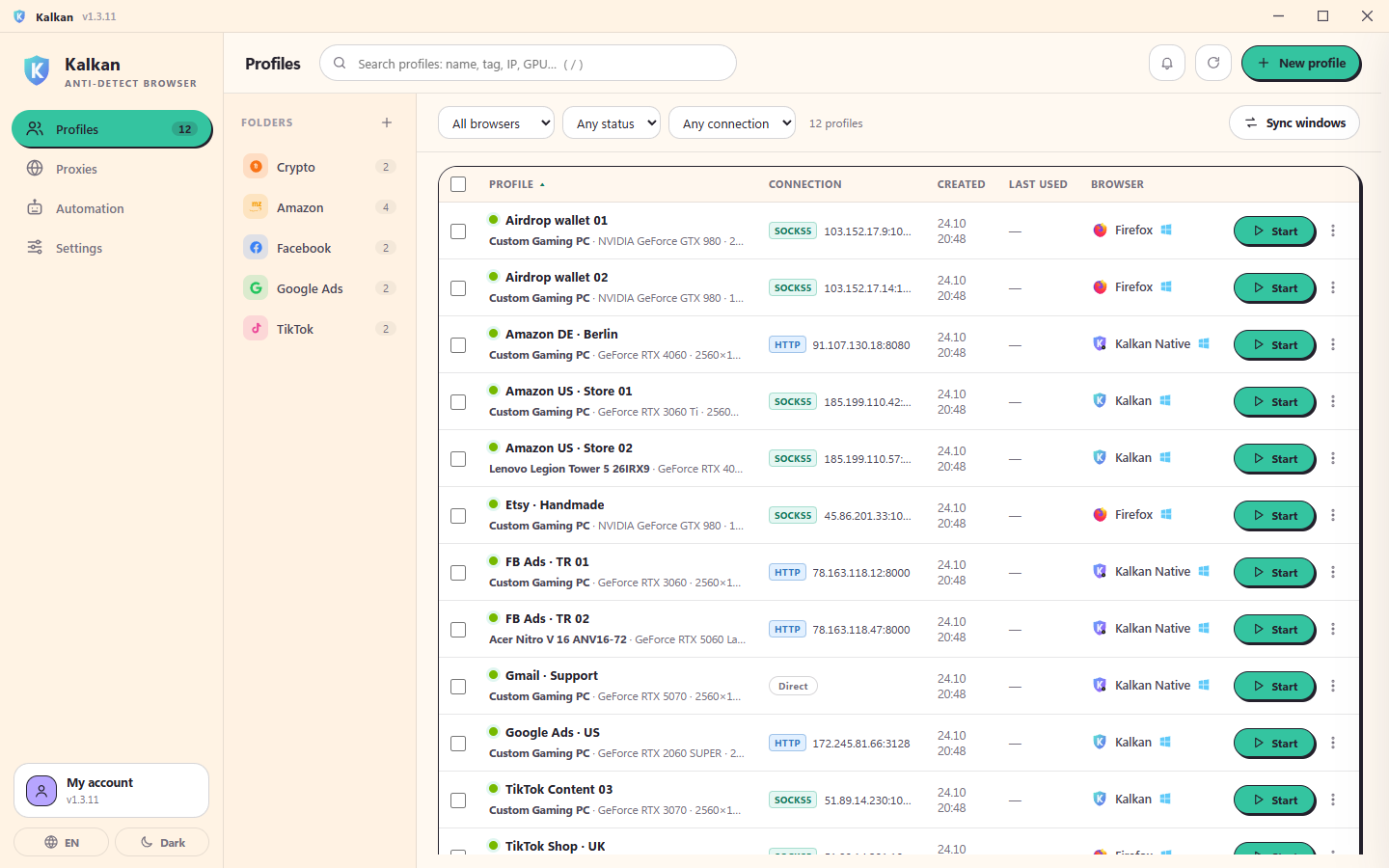
Kalkan profile list with folders, proxy country, engine and one-click start
E-commerce storesAd accountsSocial media managementAffiliate marketingMarketplace sellersCrypto and airdropsPrice and SEO researchAgency client accounts
4 enginesChrome · Edge · C++-patched Chromium · Firefox
72 hoursof offline use between checks
∞ profilesno limit on the Unlimited plan
Cryptopay through Cryptomus, no card
RPA automation

Browser automation without writing code

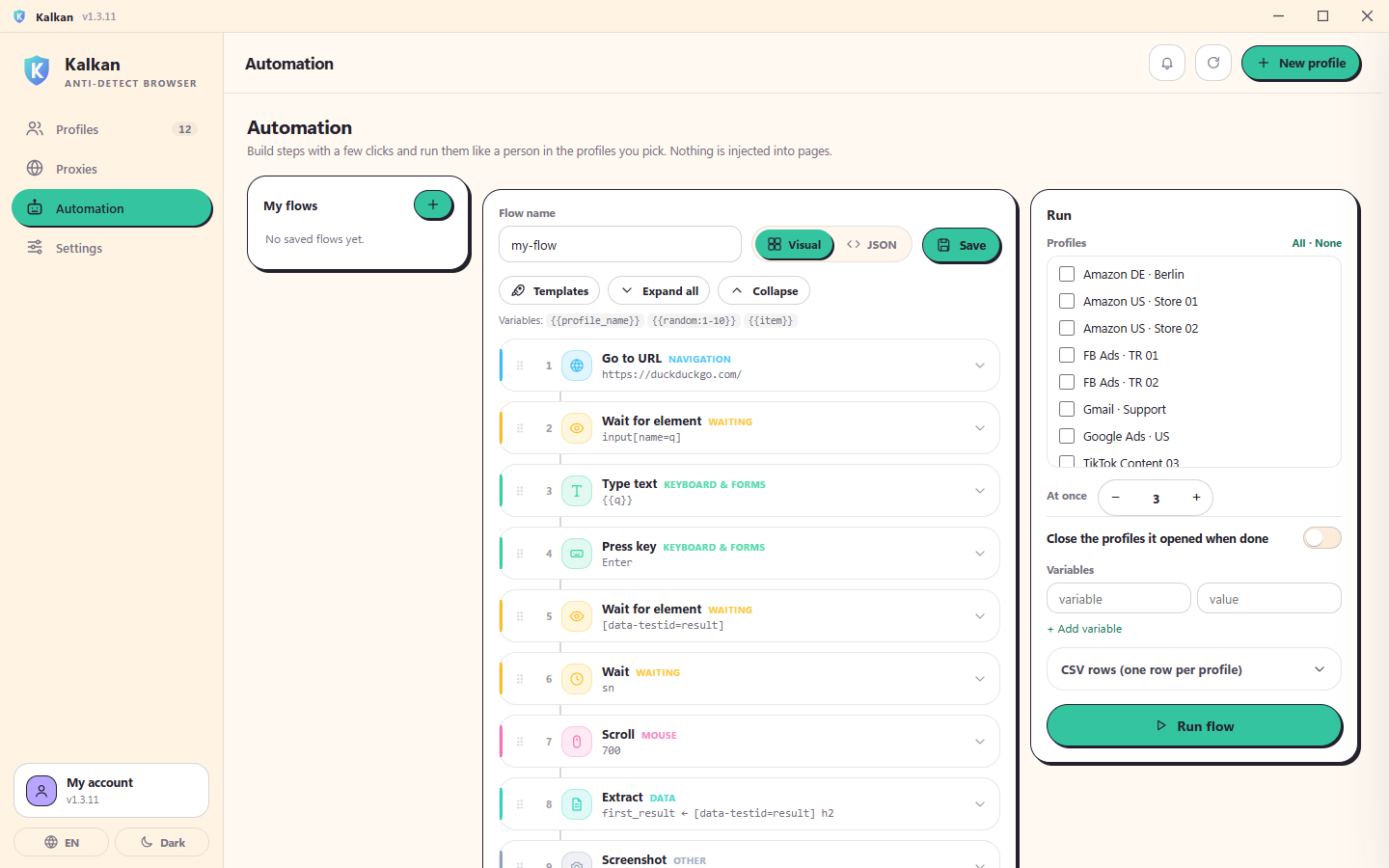
In the visual flow builder you pick steps from a list and put them in order: go to URL, click, type, wait, scroll. Variables such as {{username}} give every profile its own data. The flow runs on the profiles you choose at the concurrency you set.

  • Human-like mouse paths, typing rhythm and scrolling; every profile at its own pace
  • Condition, repeat, extract and screenshot steps built in
  • Actions come through Chrome's real input pipeline; the page's code never sees the automation
Sync

Drive one profile, every other one follows

Select profiles and press Sync. The first profile becomes the leader at the top-left of an equal grid; the others tile next to it. Every mouse move, click, scroll and keystroke in the leader is mirrored to every other profile in real time.

  • Clicks hit the same element, not the same pixel, so window sizes can differ
  • Instant mode moves them all at once; Humanized mode gives each profile its own delay and mouse path
  • Password fields are never mirrored; a profile that lands elsewhere pauses, the rest go on
4 engines

Four engines, one panel. Pick the right one for each profile.

In Kalkan you choose each profile's engine: Kalkan Native (recommended), our own Chromium build that produces the fingerprint in the browser's C++ code; Kalkan (Chrome patch), which drives the real Google Chrome on your computer with a patched driver; Kalkan Edge, the same layer on your installed Microsoft Edge; and Firefox. All four share the same profiles, proxies and sync.

  • Kalkan Native (recommended): our own Chromium with 150+ C++ patches; GPU, canvas, audio, screen and fonts from inside the browser, workers included
  • Kalkan (Chrome patch): real Google Chrome, real Widevine, the same TLS as stock Chrome
  • Kalkan Edge: the Microsoft Edge on your computer, with Edge's own identity and, if you like, an earlier Edge version
  • Firefox: the Firefox engine, with macOS and Linux profiles too
  • Real device models, WebRTC and DNS leak protection on every engine
Comparison

Why Kalkan?

The typical antidetect browser approach and Kalkan's, side by side.

Topic Typical antidetect browser Kalkan
Browser core Typical antidetect browserA modified Chromium built by the vendor; it can fall behind new Chrome releases KalkanFour engines: Kalkan Native with the fingerprint in its C++ code, the real, up-to-date Google Chrome or Microsoft Edge on your PC, and Firefox
Patches Typical antidetect browserScripts injected while the page runs; the page's code can look for those traces KalkanIn Kalkan Native the fingerprint lives in the browser's C++ code; on Chrome the patches are in place before the page's first statement
Fingerprint Typical antidetect browserRandom values field by field; GPU, screen and CPU can contradict each other KalkanReal OEM device models: GPU, CPU, screen and fonts consistent with each other
Automation Typical antidetect browserOften means writing Puppeteer / Selenium code or using a separate tool KalkanVisual RPA builder: go to, click, type, wait, scroll, variables — no code
Working across profiles Typical antidetect browserProfiles are opened and operated one by one KalkanSync: leader top-left, equal grid, every action mirrored to all profiles in real time
Network leaks Typical antidetect browserThe proxy is only handed to the browser; unless WebRTC, DNS and UDP/QUIC are handled, the real IP can leak KalkanLocal proxy tunnel, UDP/QUIC handling, WebRTC and DNS protection, kill-switch
Profile data Typical antidetect browserFrequently stored on the vendor's cloud servers KalkanOnly on your computer; our server never sees cookies or sessions

The table compares common approaches, not any specific product. No tool can guarantee going undetected on every site; Kalkan's job is to give you consistent, separate profiles that look like real devices.

Inside the app

Run hundreds of profiles from one screen

Real screenshots: profiles, profile creation with a device preview, no-code RPA and sync.

Kalkan
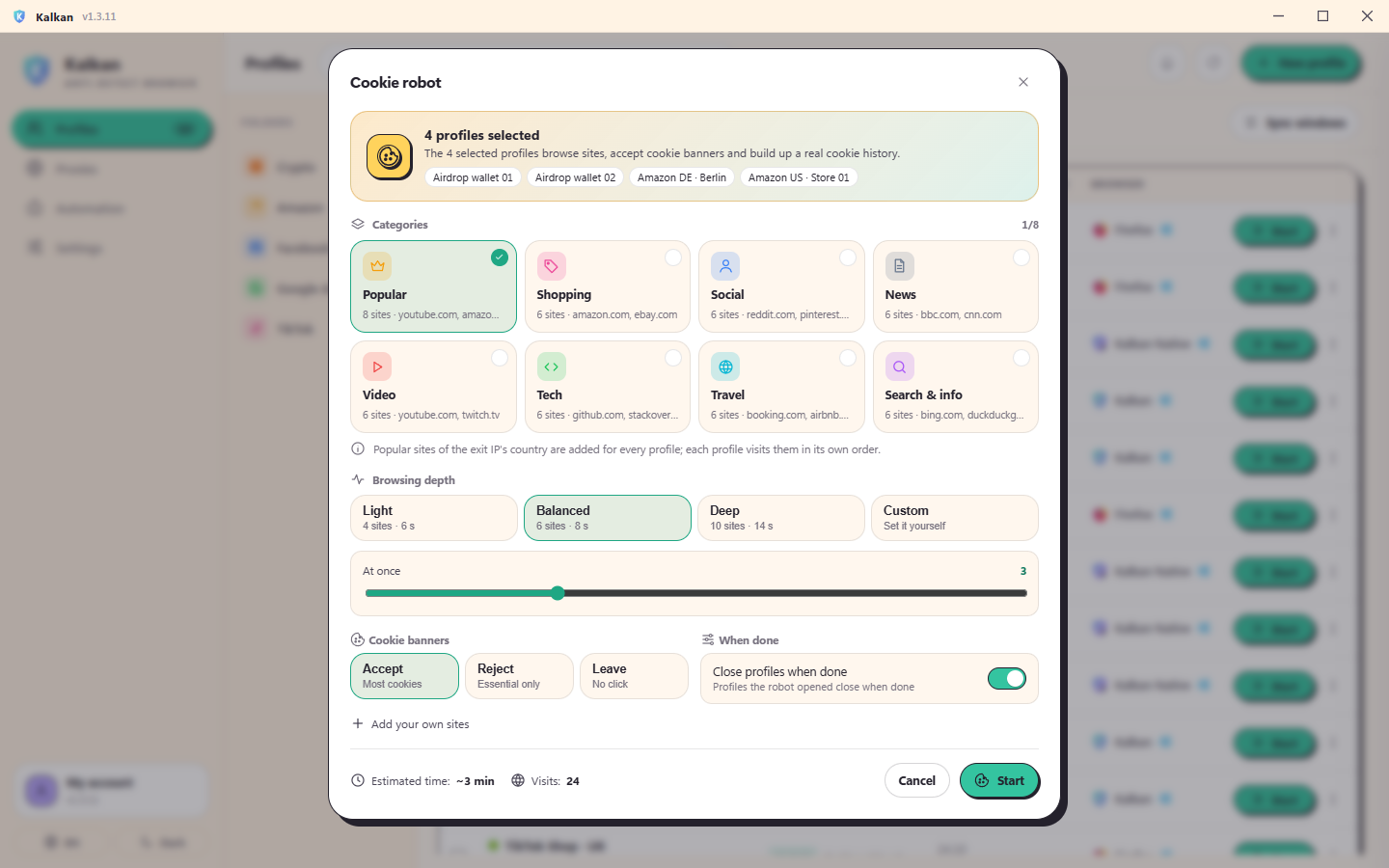
Kalkan profile list with folders, proxy country, engine and one-click startKalkan cookie robot: categories, browsing depth and live progressKalkan's no-code RPA automation builderKalkan settings: API, turbo proxy tunnel and sync
Features

Everything you expect from an anti-detect browser

Passing detection sites is the baseline. Kalkan's real job is identities that never resemble each other and never contradict themselves — across thousands of profiles.

Fingerprint

Every profile looks like a real computer

Profiles are built from real device models, not random values. GPU, CPU, screen, language and time zone never contradict each other.

  • Devices that match your own GPU generation
  • Persistent per-profile canvas / WebGL / audio noise
  • One-click creation, advanced settings if you want them
Network

Every profile has its own proxy

Import HTTP and SOCKS5 proxies in bulk; Kalkan tests each one, finds its country and sets the profile's time zone, language and location to match.

  • If the proxy drops, traffic stops (kill-switch)
  • WebRTC and UDP never show your real IP
  • Proxy passwords kept in Windows Credential Manager
Cookie robot

Your profiles build their own cookie history

The cookie robot sends the profiles you pick around popular and the exit country's local sites, accepts cookie banners like a person and builds a realistic cookie / history footprint — so your accounts don't look freshly minted.

  • Category cards, browsing depth and concurrency
  • Each profile visits in its own order — no shared trail
  • Live progress; profiles close themselves when done
Leak test

Nothing leaks around the proxy

Kalkan's diagnostics test every profile with the checks sites use. All traffic goes through a local tunnel: no proxy headers, DNS in the exit's country, no UDP around the proxy.

  • Local SOCKS5 tunnel: the browser never sees the proxy password
  • DNS-over-HTTPS through the proxy, calibrated to the exit country
  • If the proxy dies the connection stops; it never falls back to your IP
What's new

What the latest updates brought

Added in Kalkan 1.3.27 – 1.3.30. They arrive on their own when the app updates itself.

The camera: the model itself, not just its name

A profile's camera now behaves like the claimed model in every technical detail: its resolution and frame-rate list, brightness, exposure, focus and zoom ranges, facing direction and photo size all come from the model. Your own camera's values never reach the page.

Audio fingerprint and microphone

New profiles' audio fingerprint matches the values real computers report and differs from profile to profile. The microphone's sample rate and channel count and the audio latency come from the profile's device, not from your hardware.

Graphics card: real values only

A profile's graphics card shows in WebGL and WebGPU the values that card really reports. Combinations no real card produces are no longer drawn, and cards in older profiles that Windows could never report are repaired on their own.

HTTP/3 and WebRTC: a self-healing UDP tunnel

With UDP-capable SOCKS5 proxies, HTTP/3 is now verified with a real STUN measurement and turned off when UDP leaves from another IP. Dropped connections move to a new one on their own, and packet loss under heavy traffic is gone. WebRTC delay and port follow the real network of the exit.

The fingerprint layer: indistinguishable from the browser's own code

The layer that carries a profile's identity is measured against stock Chrome in every release with a battery of current detection techniques. The browser's own error messages, stack depth and timing probes no longer give it away, and the identity is in place from the first line in every tab, frame and worker.

Sessions, sync and proxy exceptions

Your logins survive even when you close the browser with the X. In sync, clicks that navigate reach every window and a page always fills its window. The proxy bypass list works with one rule format on every engine: domain, subdomains, port, IP and CIDR.

And there is more

Real device archetypes

Profiles are modelled on real OEM machines, not random values: GPU generation, CPU, screen and laptop/desktop traits all match.

Canvas · WebGL · Audio noise

Per-profile, persistent, natural-looking render noise. Same profile, same hash every time; two profiles never match.

Proxy + leak protection

HTTP / SOCKS5 per profile, with a kill-switch against WebRTC, UDP and DNS leaks. Time zone, language and location follow the IP.

Sync (multi-window)

Do it once, it happens in every profile. Windows tile evenly on your screen; clicks target the same element, not the same pixel.

RPA automation

Human-like mouse and typing; build flows and run them across hundreds of profiles at the concurrency you choose.

Self-verifying install

The system test checks your GPU, Chrome version and engine patches; if something is off it tells you how to fix it.

Start in three steps

Create an account

Sign up with your email; the 3-day trial starts at once.

Install Kalkan

Setup takes a minute; the system test checks your computer automatically.

Create your profiles

Add a proxy, create a profile in one click and open it. Kalkan handles the rest.

Pricing

Choose your plan

Every plan includes all four engines (Kalkan Native, Kalkan, Kalkan Edge, Firefox) with full fingerprint protection. Plans differ by profile count, how many run at once, and RPA.

Starter

For getting started and small jobs

$10/ 30 days

only $0.33 a day

Profiles
50
Threads
25
Devices
1
  • Every fingerprint feature
  • Sync (multi-window)
  • RPA automation on Pro and Unlimited
  • Cookie robot and proxy pool
  • Local API for your own scripts
  • Automatic updates
  • Support

Secure crypto checkout · instant activation

Most popular

Pro

For professionals and growing account counts

$25/ 30 days

only $0.83 a day

Profiles
∞
Threads
50
Devices
2
  • Every fingerprint feature
  • Sync (multi-window)
  • RPA automation
  • Cookie robot and proxy pool
  • Local API for your own scripts
  • Automatic updates
  • Support

Secure crypto checkout · instant activation

BEST VALUE -59%

Unlimited

For agencies and large teams

$99%59% off $40/ 30 days

only $1.33 a day

Profiles
∞
Threads
∞
Devices
3
Get started

Limited time

  • Everything unlimited, every feature on
  • Every fingerprint feature
  • Sync (multi-window)
  • RPA automation
  • Cookie robot and proxy pool
  • Local API for your own scripts
  • Automatic updates
  • Priority support

Secure crypto checkout · instant activation

₮₿Ξ◈USDT, BTC, ETH, TRX and 20+ coins
The plan opens the moment payment confirms
Remaining days carry over when you upgrade
No card details, no subscription
Trial — 3 days · 10 profiles · 3 at once · 1 device · no RPA
Start free trial
Guides

Guides to the antidetect world

From fingerprints to proxy leaks, from RPA to sync: what you need to know to keep accounts apart.

Frequently asked questions

Where are my profiles stored?

Only on your own computer. Proxy passwords are kept in Windows Credential Manager. Our server never sees your cookies, sessions or browsing data.

What is in the trial?

3 days, 10 profiles (3 at once), sync and every fingerprint feature. RPA automation comes with Pro and Unlimited. One trial per computer.

On how many computers can I use it?

Starter 1, Pro 2, Unlimited 3 computers. Remove a device in the panel to sign in on another one.

How do I pay?

Through Cryptomus with USDT, BTC, ETH, LTC, TRX and dozens of other coins. Your membership opens or extends automatically once the payment confirms.

Can I change plans?

Yes. When you upgrade, your remaining days are converted at the price ratio — you effectively pay only the difference.

What happens when the membership ends?

Your profiles are not deleted, only locked. Renew and they all open again exactly where you left them.

Which systems are supported?

Windows 10 (22H2) and Windows 11, 64-bit. The Kalkan engine needs Google Chrome installed and Kalkan Edge needs Microsoft Edge (Kalkan guides you if one is missing); the app downloads the Kalkan Native and Firefox engines itself.

Which browser engines does Kalkan use?

There are four engines and you pick one per profile. Kalkan Native (recommended) is our own Chromium built with 150+ C++ patches in its source: GPU (WebGL and WebGPU), canvas, audio, screen, fonts and hardware values come from the browser's own code, not from scripts injected into the page, and agree everywhere, workers included. The app installs it in the background and keeps it up to date. Kalkan (Chrome patch) drives the real Google Chrome installed on your computer with a patched, Patchright-based driver. Kalkan Edge runs the same layer on your installed Microsoft Edge; the profile carries Edge's own identity and never signs itself in to your Windows account. Firefox is our Firefox-based engine; besides Windows, macOS and Linux profiles run on it.

Is Kalkan 100% undetectable?

No tool can honestly promise that. Kalkan keeps your profiles consistent and apart with real Chrome, real device models and a leak-free network identity. Proxy quality, your behaviour and the platform's rules shape the outcome too.

Start separating your accounts today.

3 days free, no card needed.